


Instagram adds new feature: Request to join someone's live stream

The photo-sharing app now allows people to be part of their friend’s Instagram live streams
(Web Desk) – Instagram has rolled out a new update regarding its popular feature of going live by allowing people to join their friends during live streams.
This can be made possible by requesting someone to join their live stream while watching. If the person doing Instagram live accepts the requests, both users can start broadcasting live simultaneously. The first user can now host the guest by accepting the request.
In the recent blog post, Instagram unveiled the method to go in someone’s live. It can be summarised in the following steps:
1. When watching a friend’s live video, simply tap the “Request” button in the comments section.
2. One will have a moment to prepare after confirmation if the friend has accepted request.
3. Once the second person goes live, the screen will split in half so both can hang out live with each other.
4. One can leave the friend’s live video at any time. There is a convenient way of making quick hello or a longer chat live.
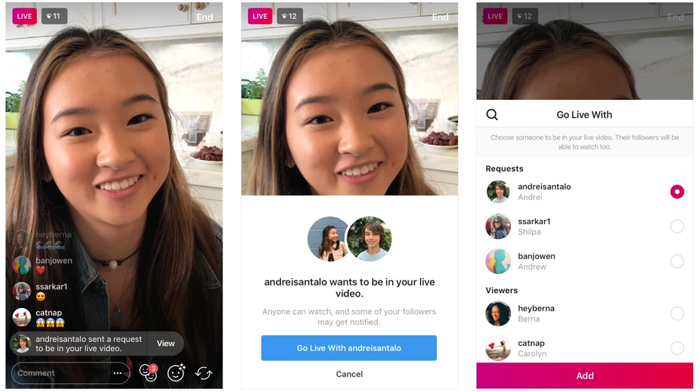
Photo: Method to accept friend request to join live
Those live can easily see requests from friends who want to join. One just has to tap the “View” button and then choose to add the particular friend or cancel the request. The new icon with two smiley faces will also have a red number showing how many requests are received. By tapping the icon, both the requests and current viewers can be seen. Instagram users can either accept a request or invite any viewer to join the live stream.
Also, it is convenient to remove a guest and add someone else to the live feature. The photo-sharing app allows users to share the live video to stories, or choose “Discard” to make the live video disappear from the app as usual.
This feature is available on version 24 of the app for Android and iOS users.
